The Consent for Evaluation form has been updated to add the words “(formal assessment)” after Hearing and Vision. While vision and hearing screenings are part of the three-year process and should be documented on the Nurse’s Report, these regular screenings do not require parental consent. Those categories should be checked on the consent form only if the student will be given a formal assessment of their vision or hearing—beyond the regular screening that all students get. The Description of Tests and Procedures that prints along with the consent form has been updated as well.
Keep in mind that the categories that are checked on the Consent for Evaluation form should align with the assessments that are actually completed during the evaluation process. If the team decides at a later date that additional areas need to be evaluated, you must have the parent sign an additional consent to test to include those areas. In the same vein, avoid checking extra areas on the consent form. If an area is included on the Consent for Evaluation, there should be a subsequent evaluation of that area.

One final note on the Consent for Evaluation—
On the referral screen in the SpEd database, there are two dates in the Consent for Evaluation section. The first date (Date Consent for Testing Sent to Parent) is the date that will print out at the top of the form. Please remember to update this field before printing a new Consent for Evaluation when you are preparing for a three-year evaluation. We frequently get forms that have a printed date from the previous three-year.
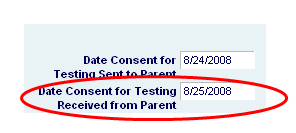
The second date is the date that you receive the signed consent form from the parent. This is the date that begins the 45-day count in which the ESER process must be completed. In most cases this will be the date when the parent signed the form. If there is a significant lag between the time the form was signed and the time that you actually received the form, then you should complete the “For District Use Only” section at the bottom of the form and note the date that you received the form.