Those of you who have already begun working in the sped database may have noticed changes in the LRE section of the IEP. We have updated the LRE screen to align with the new state sped handbook which will change the way that you enter and view data on this screen.
The student’s “Placement Code” on the LRE screen will now be automatically generated based on the data that is entered in the Summary of Services. In most cases, all you will need to do is review the placement code to ensure that it is correct.

At the bottom of the LRE screen you will find a new “LRE Placement Checklist” which must be completed for every student.
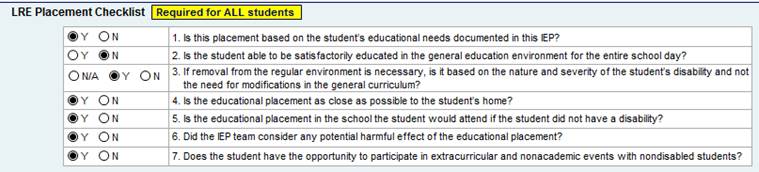
These seven questions are aimed at ensuring that each student is placed in the least restrictive educational setting possible, and is only removed from the general education setting when it is necessary to meet the student’s individualized educational needs. Any “no” responses must be addressed in the justification field below the checklist.
Because there is an error check associated with these new checklist fields, all IEP paperwork will print in DRAFT mode until these questions are completed. If you need to print IEP paperwork prior to the student’s annual review, please take a few minutes to complete this LRE checklist first.
For a more detailed explanation of these changes, take a look at the LRE section of the sped handbook: http://pupilservices.blogs.kpbsd.k12.ak.us/wpmu/kpbsd-sped-handbook/least-restrictive-environment-lre/