KPBSD Pupil Services

  • Who’s Who in Pupil Services?
    • Districtwide Staff
    • Special Ed Staff by School
  • Newsletters
  • Updates & Reminders
  • Dates & Deadlines
  • KPBSD Special Ed Manual
    • Introduction
    • Confidentiality of Information
    • Terminology
    • Special Education Records
    • Educational Records vs. Personal Notes
    • Paperwork Timeline
    • Notice of Procedural Safeguards
    • Identification – Child Find
    • Written Meeting Invitation
    • Written Notice
    • Referrals & Evaluations
    • Initial Consent for Placement
    • Parent Declines Consent for Placement in Special Education
    • Amending the ESER
    • IEP
      • PLAAFP
      • Program Mods / Accoms & Supports for School Personnel
      • Special Factors
      • Assessment
      • Summary of Services
      • Goals and Objectives
      • Secondary Transition
      • Progress Reports
      • Least Restrictive Environment
    • IEP Amendments
    • Early Childhood Indicators
    • Summary of Performance
    • Program Exit
    • Parent Revokes Consent for Services
    • Out of District IEPs / Temporary Placement
    • Manifestation Determination
    • Ages of Which to Be Aware
    • Out of Area Exceptions
    • District Data Profile
    • Appendix
  • Other Resources
    • App Request Form
    • Medicaid 2.2 Database Tutorial
    • Forms
    • Process for Special Education Evaluation
    • Behavior Plans
    • Mandt
    • PBIS
    • Secondary Transition
    • Section 504
    • Speech/Language
    • Sample Goals & Goal Banks
    • Sample Prior Written Notices
    • LD Technical Manual 2015

Sped Database Login Reminders

August 15th, 2012  

Forget how to login to the sped database over the summer?  Here’s a refresher:

1.  In the box for account name, replace your e-number with your first initial and last name (ex: jdoe). This will be your account name each time you login to the SpEd database.  Your account name is not case sensitive.
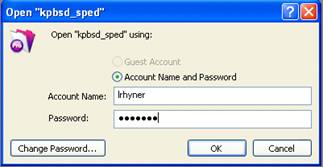
Snapshot of Login window in sped database


2.  Your password will be the same as last year.  If you need a reminder,  call the Pupil Services department and one of us can look it up for you.

3.  Once you are logged in, you can change your preferences to avoid having to re-enter your account name each time you open the database.  In the “Edit” menu, choose “Preferences.”
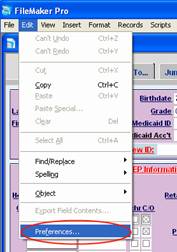
Snapshot of File Menu: Where to find Preferences


4.   Enter your user name in the box and click “OK.”
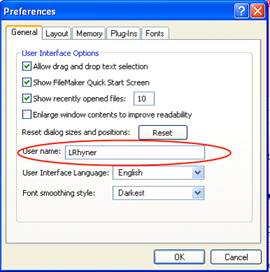
Snapshot of Preferences window

<< Change to Meeting Invites in Database
Printing Reports from FileMaker: Records Being Browsed >>
  • Tips for Using this Site:

    • Navigation Guide
  • Recent Posts

    • Database Changes – IEP Checklist
    • Database Changes – BIP in Place
    • Database Changes – Consent for Evaluation
    • Database Change – OT & PT Consult
    • FASD Resources for Teachers
  • Popular Topics:

    Accommodations Aide Annual IEP Review ASSEC Assessments Behavior Celebrations Checklist Consent Database Educational Needs Eligibility ESER ESY Evaluations Goals & Objectives Helpful Hints High School HSGQE IEP Instruction Intensive Math Meeting Attendance Meeting Invitations Meetings Outside Agency Paperwork Parents PLAAFP Printing Professional Development Reading Red Ms Referral Related Services Resources Secondary Transition Signatures Social Skills Strategies Summary of Services Timelines Transfer Updates
  • Archives

Built on Simply Works Core
Powered by WordPress

Copyright © KPBSD Pupil Services