Previewing IEPs and Printing Individual Pages

Minor revisions or amendments to student IEPs will often create the need to print a single page of a student’s IEP.  The print menu allows you to select individual pages of a student’s IEP, but you will need to know which page contains the content you are looking for.

Snapshot of IEP print screen


Because every student’s PLAAFP is different, each IEP is a different length.  One student’s “Program Modifications & Accommodations” may appear on page 3, while a different student’s may print on page 5. To avoid printing extra pages, you can preview a printed version of the IEP first, to be sure you are printing the correct page.

1. Select the student record that you wish to print, and click on the “Preview IEP” tab at the top of the screen:
Snapshot of IEP Database Tabs


2. When the preview of the IEP comes up, use the rolodex arrows in the upper left hand corner to scroll through the individual pages of the IEP:
Snapshot of IEP database Rolodex


3. Once you’ve located the page you need, hit ‘ENTER’ on your keyboard, or click the blue “Continue” button: Snapshot of "Continue" button


4. The database will then prompt you with a series of popup windows:

Print this IEP? (hit Cancel)
Print Assessment Participation Page? (hit Cancel)
Preview Additional Comments Page? (hit Cancel)
Preview Goals and Objectives? (hit Cancel)

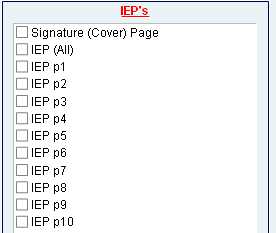
5.  The database will take you back to the Print Menu.  Use the checkboxes to select the individual IEP page(s) that you wish to print, and hit the “Print Selected Forms” button.
Snapshot of "Print Selected Forms" button


Changes to Initial Consent for Sped Services Form

The form for “Parent Consent for Special Education Services” has been revised in the database.  These revisions have been made to align with the sample form in the state handbook.

Checkboxes have been added to designate whether a parent does or does not give consent for special education services.  Parents should be signing this consent form at any initial eligibility meeting where the child meets the criteria to qualify for special education services.   This form should be signed after the eligibility meeting, but before the initial IEP is developed. If the child qualifies for special education, but the parents do not give consent for services, the team does not need to develop an IEP.

The changes to this form were made to make it clear that the parents are giving consent for the provision of special education services—not consent for a particular program or type of services.  Those details will be worked out by the IEP team, if and when the parent gives consent for the student to participate in special education.

See the New “Parent Consent for Special Education Services” form here

November 2012 FAQs


Q: I am using the Edmark program to teach reading to some of my students. Can I include the name of the program in the goals and objectives?
A: It is not best practice to include the names of specific programs in the goals and objectives for the students, but rather a general description or title of the program. For instance, for Edmark, you could say, “a sight word/ functional word based reading program.” In the PLAAFP and in the baseline for the goals, you can state where the student currently is in regards to the programs in which he/she is working. Including names of programs locks the teacher into a particular program, and if the student were to move, would lock another school into a particular program (or providing an explanation of why that program will not be used).

Back to Top

Q: I have an IEP annual and a 3-year reevaluation due in the same year, but we did not hold the meetings together. Any thoughts?
A: The most important thing to remember is that our Special Education Database holds only the most recent IEP paperwork. Once new information is inputted, the previous is deleted. Because of that, it is imperative that you plan ahead.  When an annual and a 3-year are done in the same year, but not at the same meeting (for instance, two weeks apart), you will need to send the paperwork into district office for the first meeting, BEFORE the next meeting is started so that it can be reviewed and corrected, if needed, before it is erased with the paperwork for the subsequent meeting.

Back to Top

Q: A student just transferred from Connections to my school. The IEP doesn’t make sense to be able to implement at my school. Now what?
A: When a student transfers from Connections, primarily with a consult-model IEP, the receiving school will need to amend the IEP to be able to implement the IEP at their school. This includes an amendment to the summary of services and possibly the goals and objectives to be implemented at the receiving school. Always feel free to contact the Connections special ed teacher if you have questions about the student.

Back to Top

Q: I usually send paperwork home to parents at the same time I send it to district office. It is embarrassing to have to contact the parent to correct mistakes found by district office. What can I do?
A:  The hard copy of the IEP is the legal document that the school is to follow and is the educational record for both the district and the parent. Therefore, that document must not only reflect the decisions made by the team for the student, but must reflect our best work as school district employees. Always print out the IEP and proofread it. You may consider asking a colleague to proofread it for you. You may also wish to contact the district office secretaries or your program coordinator prior to printing and sending the document anywhere, and we will be happy to proofread it for you! Proofreading should be for typos as well as for content inconsistencies or errors.

Back to Top
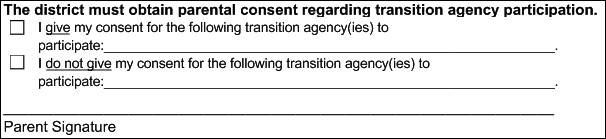
Transition IEP Cover Page – Consent for Outside Agency Participation

The following text has been added to the IEP cover page for transition age students:

The district must obtain parental consent regarding transition agency participation.  (Checkbox) I give my consent for the following agenc(ies) to participate. (Checkbox) I do not give my consent for the following transition agenc(ies) to participate.

At  Friday’s transition training, the question came up as to how to document consent for students with more than one outside agency involved in the transition process. In some instances the family may wish to include one agency and not another. This new text will allow case managers to document which agencies the parent gives consent for participation, and which (if any) the parent does not provide consent for.

The text below has also been added to the printed meeting invite for transition age students:

Note: Districts must invite transition agenc(ies), as appropriate, if a student is at transition age.  Please notify your child's case manager as soon as possible if you do not wish for the transition agency to participate in the meeting.


Please keep in mind that if an outside agency is included in a student’s transition plan, that agency should be invited to participate in the IEP meeting and must be included on the meeting invite. If the parent (or 18 y.o. student) chooses not to give consent for agency participation, we have met our obligation by inviting the agency.  Either way, the parent (student) needs to sign the consent section of the IEP cover page to indicate that they do or do not give consent.  Please use caution when including outside agencies as the provider for transition services if/when those agencies are not active participants in the IEP meeting.


End of the School Year Checklist

The End of the School Year Has Arrived!

Can you believe it is already May? Some may be thinking that the school year just flew by, while others are just so glad that it’s over! Wherever you are, Pupil Services hopes that it was a great year for all of you!

Here is a mini-checklist to help you close out the school year:

 All IEP related paperwork turned in to the district office (May 9 is the deadline!)
 HSGQE modification applications for fall testing are to be submitted to the state no later than May 21, 2012.
 Program Exit form for students who will receive their high school diploma or will age out this year need to be sent home with the final quarterly progress reports.
 Extended School Year paperwork is turned in to District Office.
 Send 4th quarter progress reports home to parents. (District office will audit the database to ensure that these were completed.)
 Prepare school files to be forwarded to the next school for students who are transitioning. Keep documentation regarding to which school and person at the school the files were sent.
 Prep fishing gear—summer here you come!