Change to Consent for Eval Form: Vision & Hearing

The Consent for Evaluation form has been updated to add the words “(formal assessment)” after Hearing and Vision.  While vision and hearing screenings are part of the three-year process and should be documented on the Nurse’s Report, these regular screenings do not require parental consent.  Those categories should be checked on the consent form only if the student will be given a formal assessment of their vision or hearing—beyond the regular screening that all students get.  The Description of Tests and Procedures that prints along with the consent form has been updated as well.

Keep in mind that the categories that are checked on the Consent for Evaluation form should align with the assessments that are actually completed during the evaluation process. If the team decides at a later date that additional areas need to be evaluated, you must have the parent sign an additional consent to test to include those areas.  In the same vein, avoid checking extra areas on the consent form.  If an area is included on the Consent for Evaluation, there should be a subsequent evaluation of that area.

Snapshot of Evaluation checkboxes in IEP database

One final note on the Consent for Evaluation—

On the referral screen in the SpEd database, there are two dates in the Consent for Evaluation section.  The first date (Date Consent for Testing Sent to Parent) is the date that will print out at the top of the form.  Please remember to update this field before printing a new Consent for Evaluation when you are preparing for a three-year evaluation.  We frequently get forms that have a printed date from the previous three-year.
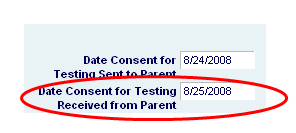
Snapshot of consent dates in IEP database

The second date is the date that you receive the signed consent form from the parentThis is the date that begins the 45-day count in which the ESER process must be completed. In most cases this will be the date when the parent signed the form.  If there is a significant lag between the time the form was signed and the time that you actually received the form, then you should complete the “For District Use Only” section at the bottom of the form and note the date that you received the form.

December 2011 FAQs

Q:  There are times when a parent is not present at a meeting, but there are places in the paperwork that need to be signed. What do I do?
A: The short answer is: it depends. Here are some situations:

1. Annual IEP Review Coversheet: Documents who was present and participated in the IEP meeting, therefore, if the parent was not in attendance (which should be the exception, not the norm), the sheet should not be sent home to be signed. Document that parents were provided the Procedural Safeguards Notice (PSN) and if grade appropriate, options for student taking the High School Graduation Qualifying Exam (HSGQE) in the Other Relevant Factors of the Prior Written Notice (PWN).

If a parent participated by phone, please print on the parent signature line “attended via telephone.” Do not

sign for the parent on the line.

2.   Consent for Evaluation/ Re-evaluation: Parent must sign. Verbal consent is not acceptable. Be sure to call the parent and review the information, then send the consent form home to be signed.

3.   Consent for Initial Placement in Special Education: Parent must sign. Verbal consent is not acceptable. Be sure to call the parent and review the information, then send the consent form home to be signed.

Back to Top

Q: What is the IN criteria that I have heard about?
R: IN stands for Intensive Needs. The IN criteria refers to a funding source for students who meet the criteria. Program managers have a checklist that is used to determine if a student meets this criteria. Program managers also document in the Sped Launcher Database when a student meets the criteria. Eligibility is determined annually. When there will be major changes to aspects of the IEP for students who meet the eligibility criteria for IN funding, please check in with your program manager as there may be additional information that needs to be discussed.

Back to Top

Q: How can I tell in the Sped Launcher Database whether my students meet the IN criteria?
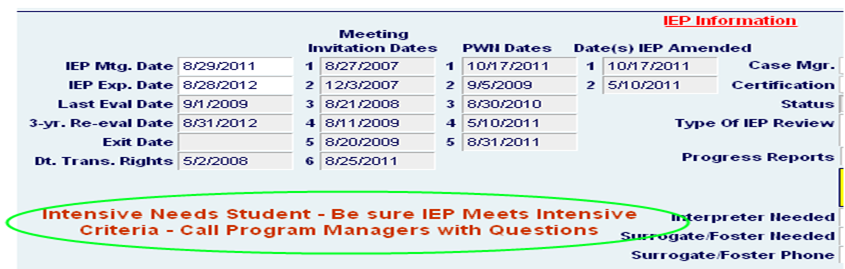
A:  There is a statement on the IEP Info Screen for the student. If the student does not meet the criteria,                   there will be no statement. If the student meets the criteria, this statement will appear:

Back to Top

Parents want to revoke consent for special education services?

There are many reasons a parent may decide to revoke consent for their child’s special education services. What do you do or say when a parent approaches you? What is the process?’

1. Encourage the parent to speak with the case manager or principal regarding their concerns and wishes. Perhaps there was a breakdown in communication that can be resolved to ensure the student continues receiving needed services.

2. Case manager will print the “Revocation of Consent for Special Services” form from the Filemaker Sped Launcher Database.

3. Case manager and/or principal will review the bulleted points on the form, ensuring the parent understands the full picture of his/her decision. Ask parent to think on it a couple of days, and if age appropriate, to speak to the child about the decision.

4. Obtain parental signature on the form. Provide copies to parent, school file, and original to district office file. Provide the parent with Prior Written Notice (PWN).  See sample revocation PWNs here and here.

Schools are encouraged to talk with their parents about the pros and cons of revoking consent for provision of special education services. Holding an IEP team meeting would allow parents to voice concerns and allow the school team an opportunity to respond to the request for revocation. At any point in the process, the school or the parent can contact the school’s Pupil Services Program Coordinator for assistance and/or more information.